

.jpg)

ONLY a few months after its June reveal, Microsoft’s free Windows 11 update to it’s common (by default) operating system is now available.
New devices shipping with Windows 10 will be eligible for a free upgrade, but it will be gradually available to existing machines. According to Microsoft, All existing and eligible computers should be offered the Windows 11 upgrade by mid-2022.
However, to the consternation of millions, not every PC with Windows 10 will be able to upgrade to Windows 11, although there will be unsupported workarounds for those who really want to upgrade.
Windows 11 requires Intel 8th Gen Coffee Lake or Zen 2 CPUs and up, TPM 2.0 (Trusted Platform Module) support, 4GB of RAM, and 64GB of storage.
Here’s how to upgrade to Windows 11 today if you have a device that meets the requirements.
- Use Microsoft’s PC Health Check app to make sure your PC can be upgraded in the first place.
- Back up your important documents, apps, and data.
- On your Windows 10 PC, head into Settings > Update & Security > Windows Update.
- If the free Windows 11 upgrade is available, there will be an option to download and install.
- Choose the download and install option.
- Follow the on-screen directions and configure Windows 11 settings to your liking.
If the free Windows 11 upgrade is not available, and you’re sure your PC is supported, you might be able to skip the line with the help of Microsoft’s new Installation Assistant.
Just click ‘Download Now’ and follow the instructions. Other options include creating a bootable USB or DVD by selecting ‘Create Windows 11 Installation Media’ and downloading a disk image (ISO) for either bootable media or a virtual machine install.
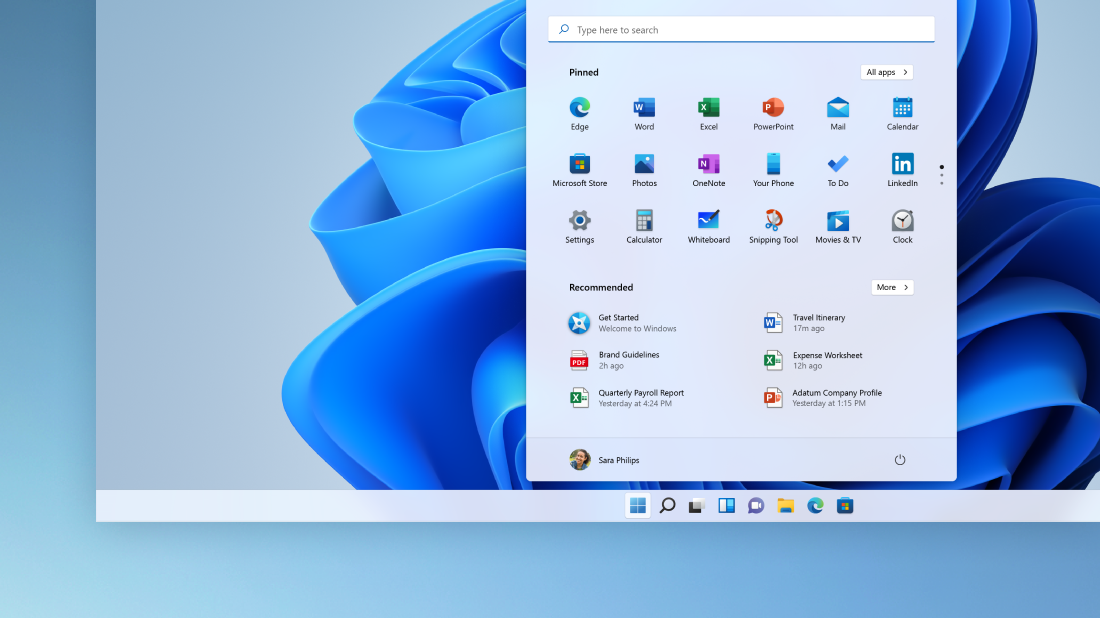
Now, as to whether an upgrade is necessary in the first place, well that’s still up in the air. Most of the early impressions call Windows 11 a fresh coat of paint that doesn’t really help or hinder how users utilise their PCs.
The biggest apparent change is to the UI as well as new multitasking features. The Start button is now centred instead of being on the left of the taskbar, which is where it's been since Windows began. Widgets will also play a big role in the look of Windows for the respective user.
It’s very likely that Microsoft wants to ease new users into the OS, holding out on bigger changes until updates down the line. – The Vibes, October 5, 2021